A camera with no GPS saves the time of each photo and nothing about the place. If a phone, watch or GPS unit recorded a track while you were taking the photos, the two can be matched by time. Each photo gets the position the track shows for the moment it was taken.
What you need
- The photos, as JPG files.
- A GPX track that covers the time the photos were taken. Most GPS apps, sports watches and GPS units can export one.
Geotag the photos
- Open Batch Geotag Photos.
- Drop in your photos, or choose a whole folder.
- Choose A GPS track and load the GPX file.
- Set the time zone the camera's clock was set to.
- Check the map and the table. Each matched photo shows its new position.
- Download the geotagged copies.
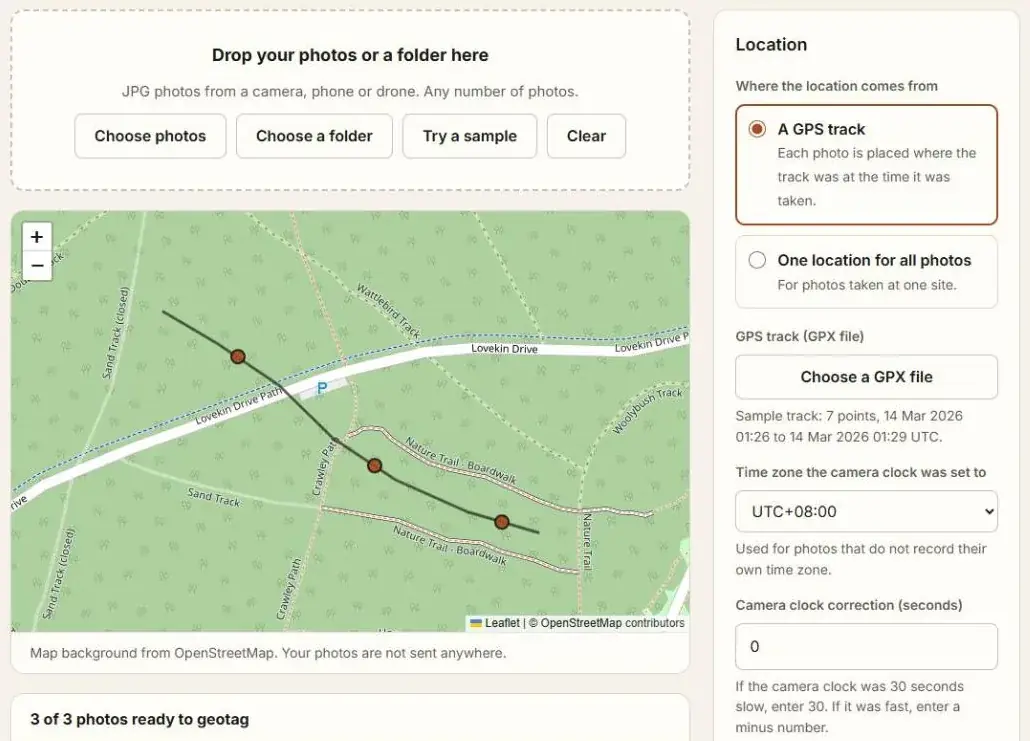
The photos stay on your device. You get copies. The original files are not changed.
How the match works
| Case | What happens |
|---|---|
| Photo taken between two track points | The position is worked out along the line between them |
| Photo taken up to 60 seconds before or after the track | It gets the nearest end of the track |
| Photo taken during a gap in the track of more than 10 minutes | It is not matched |
| Photo that already has a location | It is left alone, unless you tick the box to replace it |
The time zone matters
A GPX track records time in UTC. A camera records the time on its own clock, with no time zone. The tool needs to know which zone the camera was set to. If it is wrong by an hour, every photo lands where you were an hour earlier or later.
If no photo matches, the page shows when the track runs and when the photos were taken. Compare the two and correct the zone.
A camera clock that is a little off
Camera clocks drift. Enter a correction in seconds to shift all the photo times. To find the correction, photograph the clock of your phone or GPS unit and compare it with the time saved in that photo.
Questions
What is written into the photo?
Latitude and longitude, and the altitude and time from the track. The picture itself is not touched.
My photos have no track. Can I still add a location?
Yes, one location for all of them. See How to Add a GPS Location to Photos.